



Introduction
The Partner API is how you embed Coinpes trading in your own product. Your users sign in on Coinpes. After they consent, you call trading routes on their behalf with a short-lived access token. Referral attribution happens on that first consent if they were not already tagged.
Think of three layers. OAuth proves who the trader is. REST and WebSocket move money and prices for that one user. Webhooks notify your server about referred traders across the book — including people who never opened your UI.
What you can build
- A white-label app where people buy, sell, and open contracts without leaving your screens.
- Live balances, quotes, and open positions via WebSocket, with REST as the source of truth after a reconnect.
- Server jobs that react when referred traders register, fill orders, settle contracts, or generate commission.
Start in sandbox with a partner_test_* client and accountType: "demo". Demo never pays commission, which is what you want while the plumbing is wrong.
What stays in the dashboard
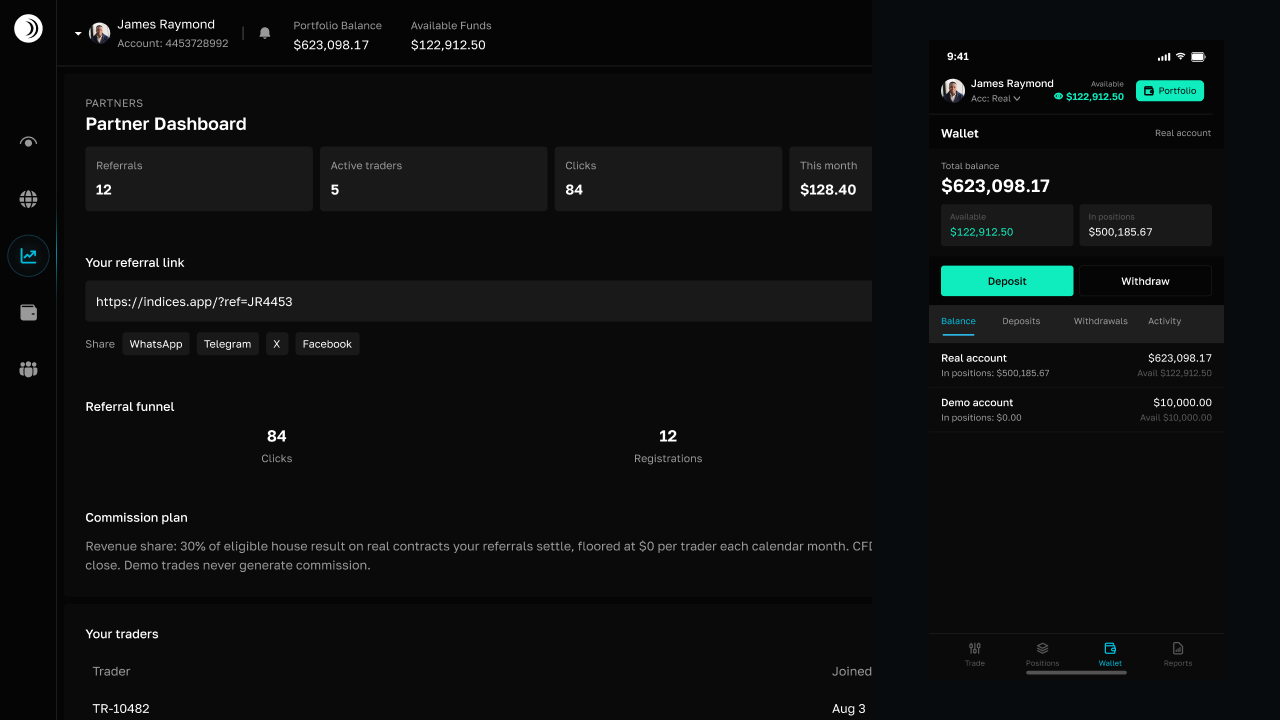
Referral stats, commission totals, payout status, OAuth apps, and webhook URLs are not Partner API resources. Open Referrals in Trade to copy your link, create sandbox or live apps (client id and secret), add HTTPS endpoints, and send a test delivery. The secret is shown once at create or rotate.
Trader lists on that page use anonymized ids such as TR-10482. Email and phone never appear on partner routes or in the dashboard table.
How a session works
- Your user clicks Connect Coinpes (or an equivalent button in your app).
- The browser goes to Coinpes's authorize URL with PKCE. They sign in or register, then allow your app and the scopes you requested.
- Coinpes redirects to your registered URI with a one-time authorization code. If they were not already referred, they are linked to your partner on allow.
- Your server exchanges the code plus
code_verifierand client secret for access and refresh tokens. - Call
/v1withAuthorization: Bearer. Default account is demo until you passaccountType: "real"on a live client.
Demo first
Omit accountType or set it to demo until quotes, orders, and error handling look right in your UI. Sandbox OAuth clients cannot operate real wallets. When you go live, use a separate partner_live_* secret on production hosts only.
Suggested reading order
- Connect users with OAuth (PKCE and token storage).
- Place trades from your app (accounts, then orders).
- Stream prices and positions (WebSocket + REST gap fill).
- Receive webhook events (HMAC, Test in Referrals, delivery log).
- Clone and deploy the example app (GitHub + Vercel).
- Test in sandbox, then lock down credentials.
Users are never created through the API. They register during OAuth. Email, phone, and legal name are never returned on partner routes.
Endpoint catalog: Partner API reference.
Frequently asked questions
Does the Partner API create Coinpes users?

Where do I see referral stats and commissions?
When is a user tagged as my referral?
Related guides
 6 MIN
6 MINConnect users with OAuth
Let traders sign in or register on Coinpes with OAuth 2.0 and PKCE, then exchange the code on your server.
6 MINPlace trades from your app
List wallets, send idempotent CFD orders, and open timed contracts with a user access token.
5 MINStream prices and positions
Bootstrap the Partner WebSocket, stream quotes and positions, and reconnect after drops.
8 MINReceive webhook events
Register HTTPS endpoints in Referrals, verify HMAC signatures, Test a signed delivery, and process events once.
5 MINTest in sandbox
Use partner_test clients and demo accounts to finish OAuth, trades, sockets, and webhooks safely.
6 MINClone and deploy the example app
Clone the Partner API example from GitHub, reskin it, and deploy the Vite app from Vercel with your OAuth client.
5 MINKeep credentials safe
Where secrets belong, which tokens to rotate, and how partner routes handle trader PII.
6 MINPartner API reference
Full Partner API reference: OAuth, trading routes, WebSocket, webhooks, and OpenAPI.